

 Loading...
Play Tiger Run online for free, where you take control of a fast and fierce tiger dashing through busy streets and wild jungles. This exciting endless runner game tests your reflexes as you dodge obstacles, jump over barriers, and slide under traps. It is super easy to start playing, with simple controls that work perfectly on your computer, tablet, or phone.
Besides just running, you get to collect gold coins and special items that help you get a higher score. Whether you're playing on a phone, tablet, or computer, Tiger Run is packed with cool power-ups, fun upgrades, and fast-paced action that keeps you on the edge of your seat.
Are you ready to test your speed and see how far you can run without crashing?
About Tiger Run
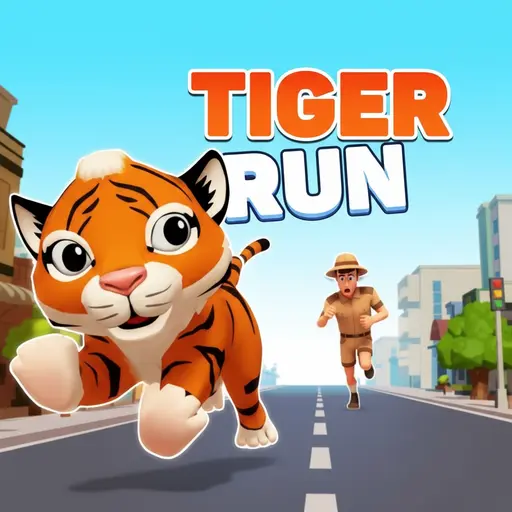
Tiger Run is a thrilling 3D endless runner game that puts you in the paws of a tiger trying to escape through a complex obstacle course. It was first released in 2021 and quickly became popular for its vibrant graphics and smooth gameplay.
The game was created by Mapi Games, a developer known for making fun and accessible HTML5 arcade games. Whether you're playing on a desktop, tablet, or mobile phone, Tiger Run is designed to offer a seamless experience with responsive controls that react instantly to your moves.
Thanks to its fast speed and colorful environments, Tiger Run continues to be a favorite choice for kids and players of all ages who love high-speed chase games and testing their reaction times!
Tiger Run Gameplay
Tiger Run is easy to learn but hard to master! You start running slowly, but the speed increases the further you go. Your main goal is to survive as long as possible while avoiding cars, roadblocks, and other hazards. Quick thinking and fast fingers are the key skills needed for success.
As you run, you will face harder challenges with more obstacles appearing in your path. However, you can pick up special boosters like magnets to attract coins or shields to protect you from one crash. This mix of survival and item collection makes this game unique compared to other simple running games.
The game features a straightforward progression system where the coins you collect can be used to buy upgrades or unlock new features. Improving your power-ups makes them last longer, helping you beat your previous high score.
Advanced players will notice that the environment changes and the patterns of obstacles become trickier. You will need to memorize common traps and react instantly to unexpected barriers. The better your skills, the higher your score will climb on the leaderboard.
Platform
You can play this game directly in your web browser, whether you're using a desktop, laptop, tablet, or mobile device.
How to Play Tiger Run?
In Tiger Run, your main goal is to run as far as you can without hitting any obstacles. You must steer your tiger left and right to change lanes, jump over low barriers, and slide under high ones. If you hit an object, the game is over, and you have to start again.
The difficulty goes up the longer you survive, meaning everything moves faster. Along the way, you should try to grab as many gold coins as possible. These rewards help you improve your score. If you crash, you can sometimes use keys or gems to revive, but usually, you must restart from the beginning.
The game ends when you crash into an obstacle. Your final score is calculated based on the distance you traveled and the coins you collected. This score is your motivation to keep playing and trying to do better next time.
Controls
Tiger Run uses simple keyboard and touch inputs that are very intuitive. Here's how you control your tiger:
- On Computer:
- Up Arrow Key: Jump over obstacles
- Down Arrow Key: Slide under barriers
- Left Arrow Key: Move to the left lane
- Right Arrow Key: Move to the right lane
- On Mobile:
- Swipe Up: Jump
- Swipe Down: Slide
- Swipe Left/Right: Change lanes
These controls are very standard for running games, making it super easy for anyone to pick up and play immediately.
Tips and Tricks for Tiger Run
Want to set a new high score in Tiger Run? These simple and helpful tips will improve your reaction time and help you unlock cool rewards:
- Look Ahead: Don't just look at your tiger; watch the top of the screen to see what obstacles are coming next.
- Upgrade the Magnet: Spend your coins on the Coin Magnet upgrade first so you can collect money without moving lanes.
- Master the Slide: You can slide while in the air to cancel a jump immediately if you see a danger ahead.
- Stay in the Center: Keeping to the middle lane usually gives you the best options to move left or right quickly.
- Grab Power-ups: Always prioritize grabbing shields or score multipliers over a few single coins.
- Don't Get Greedy: Do not risk crashing just to grab one extra coin on a dangerous corner.
- Practice Timing: Learn exactly how long your jump lasts so you don't land on top of a barrier.
- Take Breaks: If you keep crashing, take a short break to reset your focus and reflexes.
Follow these tips and you'll be running further than ever before!
---Features of Tiger Run
Tiger Run is an action-packed game designed for players of all ages. Below are the top features that make this game so enjoyable and addictive:
- Endless Runner Gameplay: The game never stops until you crash, providing unlimited fun and challenge.
- 3D Graphics: Enjoy cool and colorful 3D environments that make the run feel exciting.
- Power-Ups: Collect magnets, shields, and multipliers to help boost your performance.
- Simple Controls: Easy swipe or arrow key controls make it accessible for everyone.
- Coin Collection: Gather gold coins to spend in the shop for upgrades.
- Cross-Platform: Works perfectly on both computers and mobile devices without lag.
- Leaderboard Focus: Compete against yourself to beat your personal best distance.
- Free to Play: Enjoy the full experience without needing to pay any money.
These features make Tiger Run a perfect game for anyone who loves fast action and testing their reflexes!
Game Details
| Developer | Mapi Games |
|---|---|
| Release Date | 2021 |
| Genre | Endless Runner / Arcade |
| Platform | Web Browser, Mobile (Android/iOS) |
| Mode | Single Player |
Tiger Run Online
Tiger Run online is the special version of the popular running game that you can play right here on our website. This version has been carefully designed so that you can enjoy the game directly in your browser—without downloading or installing anything!
You can start playing Tiger Run instantly with just one click. It works smoothly on all major web browsers, including Google Chrome, Mozilla Firefox, Microsoft Edge, Safari, and Opera. Whether you're using a computer, tablet, or mobile phone, the game is fully optimized for your device.
This is a modified edition of the original Tiger Run, made for the best online experience. It keeps all the fun gameplay while running fast and safely on every browser.
Tiger Run for Free
You can enjoy playing Tiger Run for free right here on our website. This is a special modified version of the original game that allows you to play online without paying anything. No download is needed, and there are no hidden fees or in-game purchases.
Everything in the game—from the levels to the power-ups—is completely free. Kids and players of all ages can have fun without spending a single coin!
Also, all the games on our site are 100% free to play. We believe in fun gaming without limits or costs. Just choose a game and start playing instantly!
Can You Play Tiger Run Unblocked?
Yes! You can play Tiger Run unblocked anytime on our website Unblocked Games nl. Whether you're at school, in class, at work, or on a break, the game runs smoothly without any restrictions.
There's no need to download anything or bypass any blocks. Just visit our site and start running right away. It's safe, fast, and works perfectly on any device!
- Unblocked Games 76: A popular site that offers a large variety of unblocked games, including Tiger Run’s clean and engaging gameplay.
- Unblocked Games G+: Another great destination for games that are often blocked on school networks. Tiger Run is featured for quick, logic‑based fun.
- Unblocked Games 6x: Offers safe, kid‑friendly titles. Tiger Run fits perfectly with its arcade and reflex focus.
- Unblocked Games 66: Known for its extensive collection of accessible games. Tiger Run is available for unblocked play, letting you test your skills wherever you are.
- Unblocked Games 67: Provides no-download, in‑browser games. Tiger Run appears in the action section.
- Unblocked Games 77: A robust selection of unblocked games, letting you enjoy Tiger Run’s engaging platform for quick challenges.
Tiger Run GitHub
Many players search for Tiger Run GitHub versions to bypass blocks that prevent them from playing the game at school or work. While GitHub might offer some alternatives, it's often complicated and not always reliable.
But with our website Unblocked Games nl , you don't need to search for GitHub versions anymore. Our version of Tiger Run runs smoothly on all devices and networks. Whether you're in the classroom, office, or on a break — enjoy the full game online with no restrictions, no downloads, and completely for free!
Tiger Run Download
Many fans of Tiger Run love to download the game to their own devices for a better playing experience than just playing on the browser. Here's how you can do it:
- If your device runs on Android, just go to the Google Play Store and tap the install button to download the game.
- If you use Apple devices like iPhone or iPad, head to the Apple App Store and press the install button to get the game.
APK Tiger Run
If you use an Android device but can't find the game in the Google Play Store, don't worry! You can search for the Tiger Run APK file online and download it directly to your device. This way, you can install the game without using Google Play.
Also, if you love playing on your computer, you can download Tiger Run for free from the Steam store. This lets you enjoy the game with better controls and graphics.
Tiger Run Extension
Many fans of Tiger Run prefer to play the game directly on their browser using a Google Chrome extension. This lets them start playing instantly without having to visit the website every time. Plus, some extensions allow you to play offline whenever you want. To download the Tiger Run extension, click here.
Similar Games to Tiger Run
Find More Games by Category
Frequently Asked Questions (FAQ) About Tiger Run
-
What is Tiger Run?
Tiger Run is an endless runner game where you control a tiger running through a city, avoiding obstacles and collecting coins. -
How do I play Tiger Run?
Use the arrow keys on your keyboard or swipe on your mobile screen to jump, slide, and move left or right to avoid crashing. -
Is the game free?
Yes, Tiger Run is 100% free and accessible directly in your web browser. -
On which platforms can I play?
The game is available on web browsers for PC, as well as on Android and iOS devices. -
Do I need an account to play?
No, you can start running immediately without creating an account or logging in. -
Is the game suitable for children?
Yes, Tiger Run is designed for kids and features cartoon graphics with no violence. -
Are there difficulty levels?
The game does not have selectable levels; instead, the speed increases automatically the longer you survive. -
How do I progress to the next level?
There are no distinct levels; it is an endless game where the goal is to get the highest score possible. -
Can I replay the game?
Yes, you can replay as many times as you want immediately after crashing. -
Is the game multiplayer?
No, Tiger Run is a solo single-player game. There is no multiplayer mode included. -
Are there any tips for success?
Keep your eyes on the upcoming obstacles, use the slide to cancel jumps, and upgrade your magnet power-up. -
How can I improve my skills in the game?
Practice regularly to improve your reaction time and learn the patterns of the obstacles. -
What do I do if the game is lagging or crashing?
Try clearing your browser cache, updating your browser, or playing on a different device with a stable internet connection. -
Can I play without an internet connection?
No, this specific browser version requires an internet connection to load and play. -
How do I earn rewards or bonuses?
You earn rewards by collecting gold coins during your run, which can be used in the shop. -
What happens when I lose all my lives?
The run ends immediately when you crash. However, if you have a "Save Me" key or watch an ad, you might be able to continue once. -
How often does the game get updated?
The game receives occasional updates to fix bugs and improve stability. Check the game website for details on any new changes. -
Can I customize my character?
Yes, you can often use collected coins to buy different skins or outfits for your tiger. -
How do I unlock new items?
You unlock new power-up upgrades by spending the coins you collect during your runs in the main menu shop. -
Is there any way to save my progress?
Yes, your high score and coin balance are usually saved automatically through your browser’s local storage.
Why is my tiger moving slowly?
At the start of the game, the tiger runs slower to help you get used to the controls, but it will speed up automatically as you go further.
Can I play Tiger Run with a controller?
Most browser versions are designed for keyboard or touch, but you can map buttons if you use specific controller software on your PC.
What is the highest score in Tiger Run?
There is no limit to the score! Players compete to see who can run the furthest distance without crashing.
Are there enemies in the game?
There are no enemies attacking you, but the environment itself acts as the enemy with cars, walls, and pits you must avoid.
How do I use the skateboard or hoverboard?
If the game version includes a hoverboard power-up, you usually activate it by double-tapping the screen or pressing the spacebar.
Does the game have sound?
Yes, the game features exciting background music and sound effects for jumping and collecting coins, which you can mute in the settings.
Can I pause the game?
Yes, you can usually pause the game by pressing the escape key or tapping the pause button on the screen.
Is Tiger Run endless?
Yes, the game is an "Endless Runner," meaning the track is generated infinitely until you make a mistake and crash.
What are the red and blue items?
These are usually power-ups like score multipliers (blue) or magnets (red) that help you during your run.
Why did I die when I didn't hit anything?
Sometimes the "hitbox" of the tiger is slightly larger than it looks. Try to jump or slide a little earlier to be safe.
Can I play on a school Chromebook?
Yes, since this is an HTML5 game, it works perfectly on school Chromebooks as long as the website isn't blocked.
How do I turn corners?
In most versions, the track turns automatically, but you must be in the correct lane or swipe quickly if there is a sharp 90-degree turn.
What happens if I collect all the coins?
Coins appear endlessly, so you can never collect "all" of them. Just grab as many as you can to buy upgrades.
Is there a night mode?
Some versions of the game automatically switch between day and night cycles as you run further.
How do I restart quickly?
After crashing, simply click the "Play Again" or "Restart" button on the screen to instantly start a new run.
Conclusion
Tiger Run is a fantastic game that combines speed, excitement, and quick reflexes into one fun package. It helps players develop better hand-eye coordination while providing hours of entertainment. With its easy-to-learn controls, anyone can jump in and start having fun immediately.
Since the game works on almost any device and is completely free to play, it is a great choice for kids and teens looking for a quick gaming break. You don't need to spend any money or download large files to enjoy the thrill of the chase.
So, why wait? Click play now, challenge your friends to beat your high score, and become the ultimate Tiger Run champion!