

 Loading...
Play Kids Supermarket online for free, where you get to run the coolest grocery store in town! Have you ever wondered what it's like to work at a busy market? In this game, you become the manager, cashier, and helper all at once. It is fun, colorful, and teaches you how to handle money and organize items. The game is super easy to play on your tablet, phone, or computer.
This educational adventure is perfect for learning while having a blast. You will weigh fruits, scan groceries, and even catch sneaky customers. Whether you're playing on a phone, tablet, or computer, Kids Supermarket is packed with exciting minigames like sorting recycling and decorating cakes.
Are you ready to become the best store manager in the world?
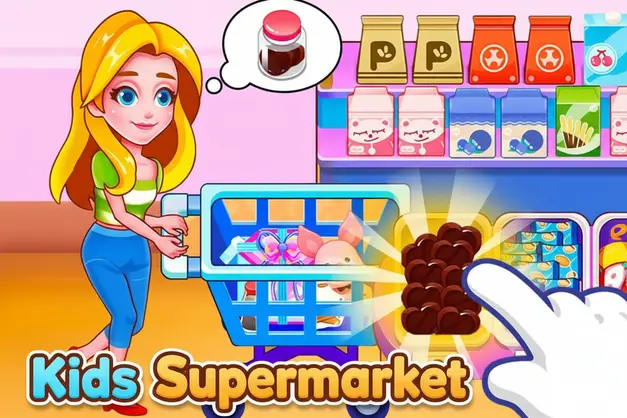
About Kids Supermarket
Kids Supermarket is an interactive simulation game that lets children experience the daily tasks of a busy grocery store. It was first released in May 2019 and quickly became a hit among young players for its educational value and cute animal characters.
The game was created by Hippo Kids Games, a developer famous for making friendly and educational apps for children. Whether you're playing on a desktop, tablet, or mobile phone, Kids Supermarket is designed to help kids develop logic, attention, and basic math skills in a playful environment.
Thanks to its vibrant graphics and variety of tasks, Kids Supermarket continues to be a favorite choice for kids and players of all ages who love role-playing and management games!
Kids Supermarket Gameplay
Kids Supermarket is easy to learn but keeps you busy with many different tasks! You start as a helper in a large store filled with animal customers. Your main goal is to assist these customers by completing various minigames located in different departments of the store. You need good observation skills and a bit of quick thinking.
As you play, you move through different sections of the store. One moment you are a cashier counting money, and the next you are a security guard chasing away bad guys. The game offers a progression system where completing tasks successfully earns you happy customers. What makes this game unique is how it turns boring chores into fun challenges.
The gameplay mechanics rely on point-and-click actions. You will drag items to the scanner, tap on correct numbers to give change, or swipe to clean up spills. There are collectibles in the form of different products to unlock, and improving your speed helps you serve more customers faster.
Advanced gameplay elements involve multitasking. You might need to weigh vegetables accurately on the scale or sort waste into the correct recycling bins. The connection between player skill and success is clear: the more accurate and fast you are, the happier your customers will be!
Platform
You can play this game directly in your web browser, whether you're using a desktop, laptop, tablet, or mobile device.
How to Play Kids Supermarket?
In Kids Supermarket, your main goal is to complete the specific task in each department of the store. You might need to find specific items on a shelf, scan barcodes at the checkout, or pack groceries into bags. You must pay attention to what the customer wants and deliver it correctly.
The game progresses by letting you choose different game modes or "departments" from the main map. Difficulty increases slightly as tasks require more precision, like counting exact change. If you make a mistake, the game is forgiving and lets you try again, so there are no harsh failure conditions.
You win a level by completing the task for the customer. There is no high score to beat, but the reward is the satisfaction of clearing the level and the fun animations that follow. This keeps you motivated to try every single department in the store.
Controls
Kids Supermarket uses simple and intuitive controls suitable for all ages. Here's how you control the game actions:
- On Computer:
- Mouse Left Click: Select items, press buttons, or interact with objects.
- Click and Drag: Move items into carts, scanning areas, or trash bins.
- On Mobile:
- Tap: Select items or confirm actions.
- Swipe/Drag: Move items across the screen or clean specific areas.
These controls are designed to be extremely easy to learn, allowing players to focus on the fun activities rather than struggling with buttons.
Tips and Tricks for Kids Supermarket
Want to become a master manager in Kids Supermarket? These simple and helpful tips will improve your speed and help you unlock cool rewards:
- Cashier Math: Take your time to look at the numbers when giving change; accuracy is better than speed.
- Weighing Accuracy: When weighing fruit, wait for the arrow to stop moving before you click the button.
- Hidden Objects: In the search mode, look for items behind other boxes or on the very top shelves.
- Sorting Trash: Learn the colors of the recycling bins (paper, plastic, glass) to sort waste instantly.
- Packing Bags: Put heavy items like jars at the bottom and light items like bread on top.
- Security Check: Watch the security cameras closely to spot the intruder quickly.
- Pizza Making: Follow the recipe order exactly when putting toppings on the pizza in the bakery section.
- Cleaning Up: When using the mop, make sure to cover every spot of the spill to finish the level.
Follow these tips and you'll be running the best supermarket in the city!
Features of Kids Supermarket
Kids Supermarket is an educational simulation designed for players of all ages. Below are the top features that make this game so enjoyable and addictive:
- Multiple Minigames: Enjoy a variety of activities like being a cashier, baker, cleaner, and stock clerk.
- Educational Math: The cashier mode helps kids learn addition and subtraction by handling money and change.
- Logic Puzzles: Sorting and recycling games teach logic and environmental awareness.
- Cute Characters: Play with adorable animal characters like hippos and raccoons that kids love.
- Interactive Objects: Almost everything in the store can be touched, moved, or interacted with.
- Vibrant Graphics: Bright colors and smooth animations keep the game visually engaging.
- Kid-Safe Interface: The menus are picture-based, making it easy for children who can't read well yet.
- No Time Pressure: Most levels allow you to play at your own pace without stressful timers.
These features make Kids Supermarket a perfect game for anyone who loves shopping simulations and learning while playing!
Game Details
| Developer | Hippo Kids Games |
|---|---|
| Release Date | May 2019 |
| Genre | Educational Simulation |
| Platform | Browser, Android, iOS |
| Mode | Single Player |
Kids Supermarket Online
Kids Supermarket online is the special version of the popular educational game that you can play right here on our website. This version has been carefully designed so that you can enjoy the game directly in your browser—without downloading or installing anything!
You can start playing Kids Supermarket instantly with just one click. It works smoothly on all major web browsers, including Google Chrome, Mozilla Firefox, Microsoft Edge, Safari, and Opera. Whether you're using a computer, tablet, or mobile phone, the game is fully optimized for your device.
This is a modified edition of the original Kids Supermarket, made for the best online experience. It keeps all the fun gameplay while running fast and safely on every browser.
Kids Supermarket for Free
You can enjoy playing Kids Supermarket for free right here on our website. This is a special modified version of the original game that allows you to play online without paying anything. No download is needed, and there are no hidden fees or in-game purchases.
Everything in the game—from the bakery levels to the cashier challenges—is completely free. Kids and players of all ages can have fun without spending a single coin!
Also, all the games on our site are 100% free to play. We believe in fun gaming without limits or costs. Just choose a game and start playing instantly!
Can You Play Kids Supermarket Unblocked?
Yes! You can play Kids Supermarket unblocked anytime on our website Unblocked Games nl. Whether you're at school, in class, at work, or on a break, the game runs smoothly without any restrictions.
There's no need to download anything or bypass any blocks. Just visit our site and start managing your store right away. It's safe, fast, and works perfectly on any device!
- Unblocked Games 76: A popular site that offers a large variety of unblocked games, including Kids Supermarket’s clean and engaging gameplay.
- Unblocked Games G+: Another great destination for games that are often blocked on school networks. Kids Supermarket is featured for quick, logic‑based fun.
- Unblocked Games 6x: Offers safe, kid‑friendly titles. Kids Supermarket fits perfectly with its puzzle and logic focus.
- Unblocked Games 66: Known for its extensive collection of accessible games. Kids Supermarket is available for unblocked play, letting you test your skills wherever you are.
- Unblocked Games 67: Provides no-download, in‑browser games. Kids Supermarket appears in the puzzle section.
- Unblocked Games 77: A robust selection of unblocked games, letting you enjoy Kids Supermarket’s engaging platform for quick challenges.
Kids Supermarket GitHub
Many players search for Kids Supermarket GitHub versions to bypass blocks that prevent them from playing the game at school or work. While GitHub might offer some alternatives, it's often complicated and not always reliable.
But with our website Unblocked Games nl , you don't need to search for GitHub versions anymore. Our version of Kids Supermarket runs smoothly on all devices and networks. Whether you're in the classroom, office, or on a break — enjoy the full game online with no restrictions, no downloads, and completely for free!
Kids Supermarket Download
Many fans of Kids Supermarket love to download the game to their own devices for a better playing experience than just playing on the browser. Here's how you can do it:
- If your device runs on Android, just go to the Google Play Store and tap the install button to download the game.
- If you use Apple devices like iPhone or iPad, head to the Apple App Store and press the install button to get the game.
APK Kids Supermarket
If you use an Android device but can't find the game in the Google Play Store, don't worry! You can search for the Kids Supermarket APK file online and download it directly to your device. This way, you can install the game without using Google Play.
Also, if you love playing on your computer, you can download Kids Supermarket for free from the Steam store. This lets you enjoy the game with better controls and graphics.
Kids Supermarket Extension
Many fans of Kids Supermarket prefer to play the game directly on their browser using a Google Chrome extension. This lets them start playing instantly without having to visit the website every time. Plus, some extensions allow you to play offline whenever you want. To download the Kids Supermarket extension, click here.
Similar Games to Kids Supermarket
Find More Games by Category
Frequently Asked Questions (FAQ) About Kids Supermarket
-
What is Kids Supermarket?
Kids Supermarket is an educational game where you manage different departments of a grocery store, helping customers and solving puzzles. -
How do I play Kids Supermarket?
Use your mouse or touch screen to tap on items, drag products into bags, and press numbers on the cash register. -
Is the game free?
Yes, Kids Supermarket is free and accessible directly in the browser. -
On which platforms can I play?
The game is available on PC, Mac, Android, iOS, and tablets via web browsers. -
Do I need an account to play?
No, you can start immediately without an account. -
Is the game suitable for children?
Yes, Kids Supermarket is designed for all ages and features age‑friendly graphics and educational content. -
Are there difficulty levels?
Yes, the game gets harder as you unlock more complex store departments. -
How do I progress to the next level?
You need to complete the task for the current customer to return to the map and choose a new level. -
Can I replay a level?
Yes, you can replay all levels at any time to get a better result. -
Is the game multiplayer?
No, Kids Supermarket is a solo game. There is no multiplayer mode included. -
Are there any tips for success?
Pay attention to the thought bubbles of the customers to know exactly what items they want. -
How can I improve my skills in the game?
Practice regularly, learn basic math for the cashier levels, and memorize where items belong on the shelves. -
What do I do if the game is lagging or crashing?
Try clearing your browser cache, updating your browser, or playing on a different device with a stable internet connection. -
Can I play without an internet connection?
No, this game requires an internet connection to be played directly in the browser. -
How do I earn rewards or bonuses?
You earn stars or happy customer ratings by completing tasks quickly and correctly. -
What happens when I lose?
There isn't a "Game Over" in the traditional sense; you can simply try the task again until you get it right. -
How often does the game get updated?
The game receives periodic updates to ensure compatibility with modern browsers. -
Can I customize my character?
While you play as a specific character (usually a Hippo), you can sometimes unlock accessories depending on the version. -
How do I unlock new levels or stages?
New store departments unlock automatically after you complete the initial tutorial tasks. -
Is there any way to save my progress?
Yes, your progress is automatically saved through your browser’s local storage.
Is Kids Supermarket educational?
Yes, the game teaches children basic math skills, sorting logic, and recognition of different shapes and colors.
Can I play Kids Supermarket on an iPad?
Yes, the game is optimized for touchscreens and works perfectly on iPads and other tablets without needing an app.
How do I weigh the vegetables?
Place the vegetable on the scale, look at the number shown on the screen, and press the matching sticker to print the price tag.
What happens in the recycling level?
In the recycling level, you must drag trash items into the correct colored bins, such as paper into the blue bin and glass into the green bin.
Is there a time limit?
Most levels are relaxed and do not have a strict timer, allowing kids to play at their own pace without stress.
How do I catch the intruder?
In the security mode, watch the camera screens carefully and tap on the character that looks suspicious or is causing trouble.
Do I need to know math to play?
You need very basic counting skills for the cashier level, but the game gives visual hints to help you learn.
Can I play as different animals?
The main character is usually a Hippo, but you will interact with many different animal customers like raccoons, giraffes, and cats.
Is there violence in the game?
No, Kids Supermarket is completely non-violent and safe for even the youngest players.
Why is the customer angry?
Customers might look unhappy if you give them the wrong item or take too long, but you can fix it by correcting your mistake.
Does the game have sound?
Yes, the game features cheerful background music and funny sound effects for every action you take.
How do I make a pizza?
Drag the dough, spread the sauce, and place the toppings exactly as shown in the picture order to make the perfect pizza.
What is the hardest level?
Many players find the cashier level the most challenging because it requires counting money accurately.
Can I pause the game?
Yes, there is usually a pause button in the corner of the screen if you need to take a break.
Is this game good for toddlers?
Yes, with parental guidance, toddlers can enjoy the simple dragging and tapping mechanics of the game.
Conclusion
Kids Supermarket is a fantastic way for children to learn about the world of shopping while having fun. It combines educational tasks like math and logic with entertaining gameplay, making it a valuable tool for skill development. With its easy-to-use interface and colorful design, it captures the imagination of young players instantly.
Since the game works on any device and is completely free to play, it is accessible to everyone. Parents will love the educational benefits, while kids will enjoy the variety of minigames and funny characters. Plus, there is no cost to start playing immediately!
So, why wait? Jump into the world of Kids Supermarket today and show everyone your amazing management skills. Don't forget to share the game with your friends to see who can run the best store!