

 Loading...
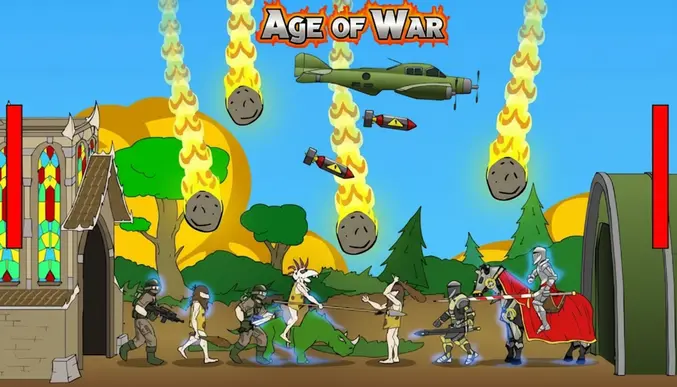
Play Age of War online for free, the legendary strategy game where you fight through history to defeat your enemy! In this exciting battle, you start as a caveman and evolve all the way to a futuristic soldier. It is super easy to control but challenging to master, making it perfect for playing on computers, tablets, and phones.
You need to defend your base while trying to destroy the enemy's castle. By defeating enemies, you earn gold and experience to unlock powerful new units and turrets. Whether you're playing on a phone, tablet, or computer, Age of War is packed with cool weapons, awesome evolution stages, and intense action.
Are you ready to lead your army through time and win the war?
About Age of War
Age of War is a classic base-defense strategy game that mixes defense gameplay with historical evolution. It was first released in October 2007 and quickly became one of the most popular Flash games on the internet.
The game was created by Louissi, a famous developer known for creating addictive web games. Whether you're playing on a desktop, tablet, or mobile phone, Age of War is designed to test your strategic thinking as you manage resources and troop deployment.
Thanks to its 5 unique ages and simple mechanics, Age of War continues to be a favorite choice for kids and players of all ages who love battle strategy and history!
Age of War Gameplay
Age of War is challenging but incredibly fun! You start in the Stone Age with a simple cave and club-wielding warriors. Your main goal is to destroy the enemy base on the other side of the screen while keeping your own base safe from their attacks. You need good timing and smart spending to win.
As you defeat enemies, you earn XP (Experience Points). Once you have enough XP, you can evolve to the next age. The game gets harder as you progress because the enemy also evolves and sends stronger units. You must balance spending gold on troops versus building defensive turrets to survive the onslaught.
The game features five distinct ages: Stone Age, Castle Age, Renaissance Age, Modern Age, and Future Age. Each age has its own unique units, turrets, and a devastating special attack. For example, in the Stone Age, you use meteors, but in the Future Age, you can call down a satellite laser strike!
You must carefully manage your gold. Buying too many weak units might leave you broke when a strong enemy attacks. Success depends on knowing when to defend, when to attack, and exactly when to upgrade your civilization to the next era.
Platform
You can play this game directly in your web browser, whether you're using a desktop, laptop, tablet, or mobile device.
How to Play Age of War?
In Age of War, your main goal is to defend your fortress and destroy the enemy's base. You must constantly train units to march across the battlefield. You must balance your budget effectively; if you run out of gold, the enemy might overrun your base.
You start in the Stone Age against another caveman army. As you kill enemies, you gain XP. When your XP bar is full, you can advance to the next age, which unlocks stronger guns and armor. If your base's health points (HP) drop to zero, you lose the game and have to restart.
The game ends when you successfully reduce the enemy base's health to zero. Winning requires you to reach the Future Age and overwhelm the opponent with Super Soldiers and tanks.
Controls
Age of War uses simple point-and-click controls. Here's how you control your army:
- On Computer:
- Left Mouse Click: Click on icons in the top menu to spawn units, build turrets, or evolve.
- Mouse Movement: Move the cursor to navigate the menu.
- On Mobile:
- Tap: Tap the screen buttons to train soldiers or build defenses.
- Scroll: Swipe if necessary to view the battlefield.
The controls are very easy to learn, letting you focus entirely on your battle strategy.
Tips and Tricks for Age of War
Want to crush the enemy base faster in Age of War? These simple and helpful tips will improve your strategy and help you unlock cool rewards:
- Save Your Special: Don't use your special attack instantly; save it for when a huge wave of enemies is attacking your base.
- Turrets are Key: Build turrets early. They stay on your base and kill enemies without you having to spend gold on new units constantly.
- Wait to Evolve: Sometimes it is better to stay in an earlier age to save gold before evolving, so you can afford the new expensive units immediately.
- Mix Your Units: Don't just spam one type of soldier. Use ranged units behind heavy melee units for the best protection.
- Watch Enemy Health: Keep an eye on the enemy base HP. If it is low, go all-out on attack to finish them off!
- Range Advantage: In the Castle Age, the archers are very powerful if you have a row of them protected by a knight.
- Don't Overspend: Always keep a little gold in reserve in case of an emergency attack.
- Sell Old Turrets: When you evolve, your old turrets might be too weak. You can sell them to make space for stronger, modern guns.
Follow these tips and you'll be dominating the battlefield in no time!
Features of Age of War
Age of War is a legendary defense game designed for players of all ages. Below are the top features that make this game so enjoyable and addictive:
- 5 Unique Ages: Evolve through history, from Stone Age cavemen to futuristic laser soldiers.
- 16 Different Units: Unlock and command a huge variety of troops, including knights, tanks, and super soldiers.
- 15 Types of Turrets: Defend your base with everything from rock catapults to laser cannons.
- Special Attacks: Unleash devastating magic and technology, like meteor showers and bomber planes.
- Simple Strategy: Easy to understand rock-paper-scissors combat that gets deeper as you play.
- Epic Soundtrack: Enjoy the iconic "Glorious Morning" music theme that fans love.
- Progression System: Gain XP to grow stronger and leave the primitive ages behind.
- Multiple Difficulties: Choose from Normal, Hard, or Impossible mode to test your skills.
These features make Age of War a perfect game for anyone who loves war strategy and evolution games!
Game Details
| Developer | Louissi (Max Games) |
|---|---|
| Release Date | October 2007 |
| Genre | Strategy / Tower Defense |
| Platform | Web Browser, Android, iOS |
| Mode | Single Player |
Age of War Online
Age of War online is the special version of the popular strategy game that you can play right here on our website. This version has been carefully designed so that you can enjoy the game directly in your browser—without downloading or installing anything!
You can start playing Age of War instantly with just one click. It works smoothly on all major web browsers, including Google Chrome, Mozilla Firefox, Microsoft Edge, Safari, and Opera. Whether you're using a computer, tablet, or mobile phone, the game is fully optimized for your device.
This is a modified edition of the original Age of War, made for the best online experience. It keeps all the fun gameplay while running fast and safely on every browser.
Age of War for Free
You can enjoy playing Age of War for free right here on our website. This is a special modified version of the original game that allows you to play online without paying anything. No download is needed, and there are no hidden fees or in-game purchases.
Everything in the game—from evolving your civilization to using special attacks—is completely free. Kids and players of all ages can have fun without spending a single coin!
Also, all the games on our site are 100% free to play. We believe in fun gaming without limits or costs. Just choose a game and start playing instantly!
Can You Play Age of War Unblocked?
Yes! You can play Age of War unblocked anytime on our website Unblocked Games nl. Whether you're at school, in class, at work, or on a break, the game runs smoothly without any restrictions.
There's no need to download anything or bypass any blocks. Just visit our site and start evolving your army right away. It's safe, fast, and works perfectly on any device!
- Unblocked Games 76: A popular site that offers a large variety of unblocked games, including Age of War’s clean and engaging gameplay.
- Unblocked Games G+: Another great destination for games that are often blocked on school networks. Age of War is featured for quick, strategy-based fun.
- Unblocked Games 6x: Offers safe, kid‑friendly titles. Age of War fits perfectly with its evolution and tactical focus.
- Unblocked Games 66: Known for its extensive collection of accessible games. Age of War is available for unblocked play, letting you test your skills wherever you are.
- Unblocked Games 67: Provides no-download, in‑browser games. Age of War appears in the strategy section.
- Unblocked Games 77: A robust selection of unblocked games, letting you enjoy Age of War’s engaging platform for quick challenges.
Age of War GitHub
Many players search for Age of War GitHub versions to bypass blocks that prevent them from playing the game at school or work. While GitHub might offer some alternatives, it's often complicated and not always reliable.
But with our website Unblocked Games nl , you don't need to search for GitHub versions anymore. Our version of Age of War runs smoothly on all devices and networks. Whether you're in the classroom, office, or on a break — enjoy the full game online with no restrictions, no downloads, and completely for free!
Age of War Download
Many fans of Age of War love to download the game to their own devices for a better playing experience than just playing on the browser. Here's how you can do it:
- If your device runs on Android, just go to the Google Play Store and tap the install button to download the game.
- If you use Apple devices like iPhone or iPad, head to the Apple App Store and press the install button to get the game.
APK Age of War
If you use an Android device but can't find the game in the Google Play Store, don't worry! You can search for the Age of War APK file online and download it directly to your device. This way, you can install the game without using Google Play.
Also, if you love playing on your computer, you can download Age of War for free from the Steam store. This lets you enjoy the game with better controls and graphics.
Age of War Extension
Many fans of Age of War prefer to play the game directly on their browser using a Google Chrome extension. This lets them start playing instantly without having to visit the website every time. Plus, some extensions allow you to play offline whenever you want. To download the Age of War extension, click here.
Similar Games to Age of War
Find More Games by Category
Frequently Asked Questions (FAQ) About Age of War
-
What is Age of War?
Age of War is a strategy game where you need to evolve through 5 different time periods and destroy the enemy base. -
How do I play Age of War?
Use the mouse to click on icons at the top of the screen to train units, build turrets, and use special attacks. -
Is the game free?
Yes, Age of War is free and accessible directly in the browser. -
On which platforms can I play?
The game is available on Web Browsers, Android, and iOS devices. -
Do I need an account to play?
No, you can start immediately without an account. -
Is the game suitable for children?
Yes, Age of War is designed for all ages and features age‑friendly graphics with cartoon violence. -
Are there difficulty levels?
Yes, the game offers Normal, Hard, and Impossible difficulty settings. -
How do I progress to the next level?
You need to earn Experience Points (XP) by killing enemies to evolve to the next age. -
Can I replay a level?
Yes, you can restart the game at any time if you lose or want to try a new strategy. -
Is the game multiplayer?
No, Age of War is a solo game where you fight against a computer AI. There is no multiplayer mode included. -
Are there any tips for success?
Build turrets early to defend cheaply and save your special attacks for large groups of enemies. -
How can I improve my skills in the game?
Practice regularly, learn which units counter the enemy units best, and manage your gold carefully. -
What do I do if the game is lagging or crashing?
Try clearing your browser cache, updating your browser, or playing on a different device with a stable internet connection. -
Can I play without an internet connection?
No, this game requires an internet connection to be played directly in the browser, unless you have the mobile app. -
How do I earn rewards or bonuses?
You earn gold and XP for every enemy unit you defeat. -
What happens when I lose all my lives?
If your base HP hits zero, you lose the match and must restart from the beginning of the Stone Age. -
How often does the game get updated?
The classic web version is stable and does not receive frequent updates, but mobile versions may get patches. -
Can I customize my character or plane?
No, the units in Age of War have fixed designs based on the historical age they belong to. -
How do I unlock new levels or stages?
There are no separate levels; the game is one continuous battle through 5 ages. -
Is there any way to save my progress?
Yes, your progress within a match is saved automatically, but if you close the browser, you usually have to start a new war.
How many ages are there in Age of War?
There are exactly 5 ages in the game: Stone Age, Castle Age, Renaissance Age, Modern Age, and Future Age.
What is the strongest unit in Age of War?
The strongest unit is the Super Soldier, which becomes available once you reach the Future Age.
Does Age of War have cheats?
The original game does not have built-in cheats, but some hacked versions exist online that give unlimited gold.
Can you sell turrets in Age of War?
Yes, you can sell a turret to make space for a new one by clicking on the spot where the turret is built.
What is the best strategy for Age of War?
The best strategy is to balance defense with turrets while saving enough gold to mass-produce units when the enemy is weak.
How long does a game of Age of War take?
A typical game lasts between 10 to 20 minutes, depending on the difficulty level and your strategy.
Why can't I evolve to the next age?
You cannot evolve until you have filled your XP bar by defeating enough enemy units.
Is Age of War 2 better than the first one?
Many players enjoy Age of War 2 for its improved graphics and more units, but the original is a classic favorite.
Can you repair your base in Age of War?
No, you cannot repair your base health, so you must protect it carefully with turrets and units.
What happens if I use the special attack?
Using a special attack triggers a powerful event, like a meteor shower, that damages or kills all enemies on the screen.
Who composed the Age of War theme song?
The famous song "Glorious Morning" was composed by Waterflame and is one of the most recognized tracks in flash gaming.
Is Age of War available on Steam?
Yes, the developer has released a version of the game that you can download on Steam.
Do units heal over time?
No, units do not heal; once they take damage, their health remains low until they are defeated.
What is the hardest difficulty in Age of War?
The "Impossible" mode is the hardest difficulty, where the enemy evolves very fast and has a lot of gold.
Can I play Age of War on iPhone?
Yes, you can download the official app from the Apple App Store to play on your iPhone.
Conclusion
Age of War is an amazing game that combines history, strategy, and fast-paced action into one package. It helps you develop quick thinking and resource management skills while having a blast evolving from a caveman to a futuristic commander. It is super easy to pick up and play, making it accessible for everyone.
Whether you are playing on your computer or mobile device, this game offers hours of free entertainment. It is completely safe for kids and provides a fun challenge that feels rewarding to beat. Plus, with no cost to play, you can start your war immediately.
So, what are you waiting for? Start playing Age of War now, challenge your friends to see who can survive the longest, and become the ultimate master of time and war!